Custom Presets for Mixed Lighting in Real Estate Photography
Michael • September 18, 2025 • 5 min read


Michael • September 18, 2025 • 5 min read

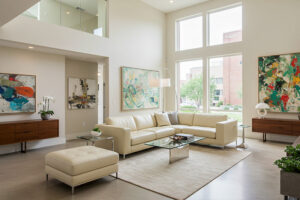
Mixed lighting is a headache every real estate photographer meets sooner or later. Daylight spills through windows while warm tungsten bulbs glow across the ceiling. Your camera captures both, and suddenly the walls look orange, the windows blue.
If you want a ready-made solution, check out the Pro Real Estate Presets for Lightroom. They’re designed to balance warm and cool tones in just a few clicks, saving you from endless slider work.
You can tame that chaos. Here’s how to work smarter with Lightroom and custom presets.
Content

Mixed lighting happens when multiple light sources with different color temperatures exist in the same frame. Your camera sees all these colors, but our eyes naturally adjust. The result? Photos that look like they were taken through a kaleidoscope.
Here’s what you’re typically dealing with:
Quick Fix Tip: Mixed lighting occurs when different light sources with varying color temperatures illuminate the same scene, creating color casts that can make properties look unprofessional and uninviting.
Instead of starting from scratch on every image, build a preset aimed at rooms with daylight and warm bulbs.
| Lightroom Panel | Key Adjustments | Why It Matters |
| White Balance | Temp: 4500 K start | A middle point balances cool and warm |
| HSL | Reduce Orange Sat -10 | Cuts orange wall cast |
| HSL | Boost Blue Luminance +15 | Keeps windows natural |
| Tone Curve | Gentle S-curve | Adds depth without clipping |
| Calibration | Red Primary -5 | Fine-tunes subtle pink tints |
Save it as “Mixed Light Base” and sync it across the shoot. Then make small tweaks per room.

These habits cut editing time and make your custom preset even more effective.
Sometimes standard presets aren’t enough. Here’s when you need to go deeper:
Color Grading Wheels: Use the shadows, midtones, and highlights wheels to target specific tonal ranges. Cool shadows, neutral midtones, and warm highlights often work well in mixed lighting scenarios.
HSL Adjustments: Target specific colors that are causing problems. Often, adjusting the luminance and saturation of oranges and blues can balance mixed lighting without affecting the overall image.
Luminosity Masks: Create masks based on brightness levels to apply different color corrections to different exposure zones. This technique works particularly well when windows are blown out but interior lighting looks natural.
According to a study by the National Association of Realtors, homes with professional photography sell 32% faster than those with amateur photos (source). Getting mixed lighting right is a big part of what separates professional work from amateur attempts.
Don’t overcorrect tungsten lighting. Yes, it’s warm, but completely removing the warmth makes rooms feel cold and uninviting. A slight warm cast in living areas actually helps buyers feel more at home.
Watch out for green skin tones in bathrooms. When you’re correcting fluorescent lighting, check how people look in mirrors. Nobody wants to see themselves looking seasick.
Avoid making windows pure white. Some photographers blast the exposure to “fix” mixed lighting, but this creates an unnatural look. Learn more about fixing common real estate photo mistakes to avoid these pitfalls.
Mixed lighting doesn’t have to slow down your workflow. The right custom presets, combined with solid shooting technique, can turn challenging lighting into an opportunity to showcase your skills.
Remember, the goal isn’t perfect color temperature across the entire image. It’s creating a natural, inviting look that helps potential buyers imagine themselves in the space. Sometimes a warm kitchen and cool bathroom in the same shot actually looks more realistic than perfectly balanced lighting throughout.
For beginners looking to understand the fundamentals, check out our real estate photography editing guide before diving into advanced mixed lighting techniques.
Want to see what professional-grade presets can do? Take a look at magazine-ready real estate photos created using advanced preset workflows.
The most successful real estate photographers understand that mixed lighting situations are opportunities, not obstacles. With the right custom presets in your toolkit, you’ll handle any lighting scenario with confidence while delivering consistent, professional results that help properties sell faster.
Master mixed lighting in real estate photography with custom presets, and you’ll transform one of the most challenging aspects of property photography into your competitive advantage.
Related Articles
Your thoughts and questions