



Want cinematic car shots? Get presets that turn cars into stars.



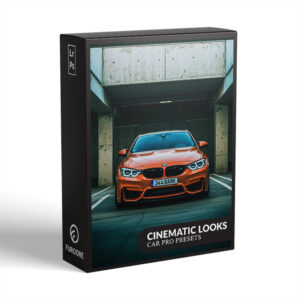

Cinematic Car Photography Presets with Moody Film Look
$29.90
Ever wish your car photos looked ripped from a Hollywood blockbuster? These Cinematic Looks Car Presets for Lightroom mimic the color magic of big-screen car chases and iconic hero shots. Imagine one-click edits that turn your shots into cinematic stunners – no color grading skills needed.
Grab your presets now and give your portfolio that movie-wow factor.
✓ Cinematic Looks Car Preset Collection
✓ Save Time and Energy
✓ Professional Look with One-Click
✓ Streamlined Editing Process
✓ Very easy to use
✓ Instant Digital Download
“These made my Tesla look like it’s in a Mission Impossible chase. Worth every penny.” – from Alexander H., freelance photographer
Cinematic Looks Car Presets – Edit like Hollywood
Feel like a director crafting the next Fast & Furious. These presets inject adrenaline into every shot: moody rain-soaked roads, desert heat haze, neon-lit streets. Don’t just take pictures – tell stories.
Make your audience feel the roar.
What’s Included
✓ 12 Cinematic Looks Car Presets
✓ 15 Clean Edit Presets
✓ File format: XMP, DNG
✓ Including 12 DNG files
✓ 1x Instruction Guide (PDF)
Clean Edit Presets
Clean Edit Presets help you build the perfect base for your photo by adjusting one setting at a time – like white balance, exposure, or whites. Each preset tweaks just one thing, so it won’t mess with any other edits you’ve already made.
Compatible with:
» Adobe® Lightroom® 7.5 or later
» Adobe® Camera Raw 10.5 or later
» Adobe® Lightroom Mobile
» Android & iPhone
Cinematic Looks with Movie Style Car Presets


Give your car photos instant edge with presets made for auto lovers. Transform dull shots into eye-catching stunners – explore our full Car Lightroom preset collection today.
FAQ
Do you have Cinematic Car Presets Tips?
- Shoot in RAW for better color.
- Underexpose slightly to keep detail in bright skies.
- Clean your car first—dust shows up!
- Shoot during “golden hour” (sunrise/sunset).
- Use a polarizer to cut windshield glare.
- Apply presets FIRST, then adjust brightness if needed.
- Lower the “Clarity” slider for vintage film looks.
- Bump up “Texture” to make tires/grilles pop.
How to Download and Install the Presets
As soon as your payment is complete, you’ll get a download link sent straight to your email.
Just follow the easy steps in our How to Install Lightroom Presets guide, and you’ll be ready to start editing on your computer or phone in no time!
How to use Lightroom Presets?
Lightroom Presets with Easy Adjustment
These Lightroom Presets were created by a pro photographer, so you can trust they’re designed to make your photos look amazing, no matter if you’re using a fancy camera or just your phone.
Using them is super easy! Whether you’re editing on your computer or your phone, you can get great results in just a few steps.
Here’s how it works:
- First, take a photo with any camera – DSLR, mirrorless, point-and-shoot, or even your smartphone.
- Next, open that photo in Lightroom.
- Then, add one of the presets to your photo with a single click.
Just a heads-up: presets won’t always look exactly the same on every photo. Things like lighting, color, or how the photo was taken can make a difference. If the photo’s too dark, too bright, or low quality, the preset might not work as well.
After you apply a preset, you might want to tweak a few things to get the perfect look. That’s totally normal! Just play with the sliders in Lightroom until it looks right.
Also, if there are people in your photo, a preset might slightly change their skin tone. No worries, just adjust the colors a bit until it looks good to you.
Presets are here to help you start strong, but a little fine-tuning goes a long way. Have fun editing!
Can I use the Presets in Photoshop?
Yes, these Cinematic Car Presets also work in Photoshop!
You’ll need Adobe Camera Raw (ACR) version 10.3 or higher (for both Windows & Mac).
How to install:
- Open your photo in Photoshop.
- Go to the top menu > Filter > Camera Raw Filter.
- On the right, click the menu next to “Basic,” then choose Load Settings.
- Select the .xmp file from your unzipped download and click Load.
- Hit OK to apply the preset.
How to use the Clean Edit Presets?
Clean Edit Presets help you build the perfect base for your photo by adjusting one setting at a time – like white balance, exposure, or whites. Each preset tweaks just one thing, so it won’t mess with any other edits you’ve already made.
What are your Terms/License?
These presets are just for you! You’re welcome to use them for personal or commercial projects, but you can’t share, sell, or redistribute them to anyone else.
This license is for one individual only – it doesn’t cover companies or teams.
Please note:
Since these are digital downloads, all sales are final. That means no refunds, returns, or exchanges.
2 reviews for Cinematic Car Photography Presets with Moody Film Look
Add a review
You must be logged in to post a review.
• Start getting beautiful Photos in Minutes
Creating pretty photos and looking for the right tone effect can be very tough. For this reason, we at Furoore have spent countless hours for you creating Easy-edit workflow Lightroom presets.
• Quality above Quantity
We respect our customers and try our best to provide extra high-quality presets to simplify the editing. With our presets you achieve unique results in one click. You can easily adjust them to your own style or the look you are going for.
• One Time Lifetime Purchase
You only pay once to use your presets for your photos for as long as you want.
Related products


$29.90
$29.90
$29.90

Simon C. –
Pretty happy with these car presets! They give my car shots a cool, Hollywood vibe. Applying them is a breeze. Some presets need a bit of contrast adjustment. My Insta feed got an upgrade. Recommend!
Alexander G. –
What I appreciate is the attention to detail. These presets don’t just crush the blacks and call it a day. They carefully handle the highlights on the chrome and the subtle color shifts in the reflections. It’s clear this was made by someone who knows and loves cars. A powerful tool for storytelling.