Camera Shutter Speed Explained for Beginners
Michael • updated June 1, 2022 • 8 min read


Michael • updated June 1, 2022 • 8 min read

You may have started noticing that when you take a picture, it generally makes a sound like a click. That’s the shutter inside your camera. It always opens and closes the same way, but the speed at which it does so can be changed. Now we can talk about the shutter speed.
To get the right exposure, you have to choose the right shutter speed or exposure time. But what exactly is the exposure time? In this article, we’ll show you how to do just that.
You will learn how the shutter speed, ISO value, and aperture all work together. How to avoid or create blur and motion blur, and how to set the exposure time on your camera. The days of blurry pictures are over.
Content
The shutter speed of a camera is exactly what the name implies: the rate at which the shutter closes.
The shutter is in front of the camera sensor and blocks the light that enters the camera through the lens. Whenever you push the shutter button to take a photo, the shutter opens and the sensor is exposed to light.
The resulting image is recorded for as long as the shutter is open. Therefore, the shutter speed indicates how long an image is exposed to light. This might range from milliseconds to minutes.

Shutter speed is calculated in seconds or in fractions of a second. A shutter speed of 1/2 implies a shutter speed of half a second, whereas 1/2000 means it only remains open for one-two-thousandth of a second.
Modern DSLRs and mirrorless cameras can shoot at shutter speeds as fast as 1/4000th of a second, and some can even shoot at 1/8000th of a second and faster. Most DSLRs and mirrorless cameras, typically have a maximum shutter speed of 30 seconds.
how shutter speed interacts with ISO and aperture, as part of the Exposure Triangle, is crucial in managing how your photographs turn out.
Shutter speed is one of three components, how your exposure turns out, or how bright or dark your photo will become. Changing the shutter speed gives you a large range of creative alternatives.

Aside from the shutter speed, you can modify the exposure also with aperture and ISO. To begin, you can use the aperture to regulate the brightness of the photograph. Next, you can modify the ISO value.
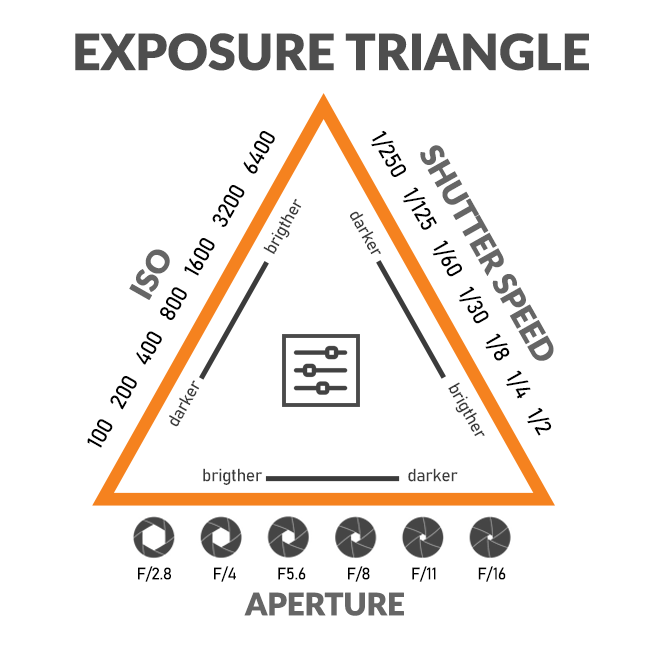
However, even if you have never worked with a different aperture or a higher ISO number for exposure, you can still work with the shutter speed quite easily and rapidly, when switching your camera to Av or A mode.
When you use a slow shutter speed, the shutter stays open for a longer period of time. This not only enables further light to be captured but also causes moving things to appear blurry.
Slow shutter speeds are typically utilized while photographing in low light situations or when capturing motion blur. Use a tripod to avoid any unnecessary motion caused by camera movement. This helps to avoid capturing camera movement in the image.
With a slow shutter speed, you can show what’s going on in a scene. Slow down the shutter speed if you wish to portray the movement of your subject.
Slow shutter speed ensures the shutter is open for a longer period of time, allowing more light in, and blurring everything moving.

For example, if you want to highlight the motion of waves or a swirl of water, lock your focus, and use a tripod. Try a shutter speed of 1/8s or even lower to show a silky movement of the water.
Slow shutter rates can be also useful for creative methods like panning, or they can be combined with a flashlight to capture take both frozen and blurred action photos.
However, don’t use a shutter speed that is slower than your focal length (for example, if shooting with a 50mm lens, don’t go lower than 1/50, and if shooting with a 200mm lens, don’t go lower than 1/200). If you do, you may need to utilize a tripod.

You need a fast shutter speed when you want to take a picture of something moving, like a bird in flight, a racing car on the track, or your buddy hopping over a fence.
Keeping the subject sharp and in focus, while blurring the background helps to create the atmosphere and tell the tale of that specific moment. A shutter speed starting at 1/800s will allow you to completely freeze the motion.

There is no best shutter speed, it always depends on the light condition and what you like to achieve. As a starting point, in bright sunlight, you’ll need a quick shutter speed, such as 1/500 second or more. If you take photos indoors, there is typically less light, and you need a slower shutter speed, such as 1/100 second or less.
Shutter speed examples:
When you shoot in Auto mode, your camera decides the shutter speed (together with the aperture). When shooting Shutter Priority mode which is marked as TV or S, you can manually regulate the shutter speed, giving you far more creative freedom.

Shutter priority is an excellent choice for beginner photographers who want to go away from Auto mode but don’t want to deal with aperture settings. The aperture is estimated by the camera.
DSLR cameras display the shutter speed on the top LCD panel, as well as in the viewfinder and on the backscreen. The settings to change the shutter speed differs from camera to camera, some even let you choose which control wheel handles the setting.
The shutter speed value always depends on where and what you photograph. A rapid shutter speed is the greatest option for freezing motion while capturing fast-moving objects.
However, because this reduces the amount of light reaching the sensor, you may need to adjust by using a wider aperture.
Moving subjects often blur in the image when you shoot them with a slow shutter speed. With a slow shutter speed comes the added difficulty that you have to hold the camera still for a long time.
Not only the moving subject but the whole image will be blurred, but also the camera shake comes into play. Tripods can prevent this problem.

With the reciprocal rule (freehand limit) you can calculate up to which shutter speed you can shoot without a tripod.
The reciprocal rule is one of the most fundamental rules of photography. In order to avoid “camera shake,” or the blur that comes from any tiny movement of the camera during the shooting of the image.
For example, if you shoot with a 300mm lens, your shutter speed should be not less than 1/300s. The longer the lens, the faster the shutter speed. Overall, it is safe to say that the camera shake starts below a shutter speed of 1/50s.
It’s important to keep in mind that these are just suggestions; actual outcomes may vary based on your camera, the lens, and your ability to hold the camera stable.
Furthermore, “camera shaking” should not be confused with “motion blur,” which is the blur caused by moving objects in an image.

Not all blurry photos are for the waste bin. Shutter speed can be used to minimize unwanted blur, it can also be used to purposely produce motion blur.
Motion blur is a photography practice in which a slow shutter speed is being used to blur moving subjects. with a slower shutter speed, you can effectively blur motion or just a little with a modest amount of movement and a faster shutter speed.
Motion blur produces photos that are purposefully blurred to show motion. It simulates how the human eye perceives fast movement as a moving, unfocused object.
It’s so enticing and eye-catching that it’s become its own category of photography, which is called “motion blur photography”.
The camera or the subject must be moving while the photo is being taken to get the motion blur effect. The motion blur effect will appear on the subject if the camera is fixed and the subject is moving (e.g., a jogger).

The motion blur effect will appear in the background if the camera follows the moving subject which is called panning. This effect can also be achieved by photographing from a moving vehicle, in which case the motion blur will appear in the front.
A photograph can be taken only with the shutter open, but any object that moves during this time frame will be blurred. For example, if you like to shoot a moving racing car on the track, you have to ask yourself, do I like to show motion or freeze the race car.
For freezing the race car you may use a shutter speed of 1/500 and the car will be sharp. If you like to capture the car with a motion blur, you can set the shutter speed to 1/80, the car will be blurry.
As previously stated, high shutter speeds (settings such as 1/500s or 1/1000s or greater) are used in sports and action photography. The 1/250 setting should be adequate for most humans and animals who are not on the run.

The use of a tripod is one of the most basic strategies to ensure that your photographs are sharp. The best condition is to utilize one in low-light situations if possible.
This allows you to shoot at extremely slow shutter speeds while still capturing clear photographs. When taking long exposure photos, make sure you utilize a tripod.
Beginner Photography Sections
» How to start Photography
» DSLR or System Camera
» Aperture
» Shutter Speed
» Camera ISO
» Exposure
» White Balance
» Histogram
» Camera Modes
» Camera Focus Modes
» Sharp Images
» Composition – Rule of Thirds
» Photography Mistakes to avoid
» Important Tips for Beginners
The shutter speed of a camera is the rate at which the camera sensor is exposed to light. Modern DSLRs and mirrorless cameras can shoot at shutter speeds as fast as 1/4000th of a second or more.
When you use a slow shutter speed, the shutter stays open for a longer period of time. Slow shutter speeds are typically utilized while photographing in low light situations or when capturing motion blur.
Faster shutter speeds also freeze movement and are frequently utilized when photographing scenes with quick pacing subjects such as sports, animals, or action. This helps to avoid capturing camera movement in the image.
There is no best shutter speed, it always depends on the light condition and what you like to achieve.
Don’t forget to share this article!
Related Beginner Articles

Beginner Photography

Beginner Photography

Beginner Photography

Beginner Photography
Your thoughts and questions