Download Free Night Preset for Stunning Edits
Michael • August 8, 2025 • 5 min read


Michael • August 8, 2025 • 5 min read

If you’re searching for night presets Lightroom free download, you’re in the right place. This isn’t just a list of random downloads – this is a shortcut to cleaner, moodier, and more cinematic night photos, even if your lighting was a mess or your ISO was pushed way too high.
I’m sharing one of my go-to night photography presets, Nightfall Pro, and walking you through how to actually get the best out of it.
No fluff. No “inspirational journeys.” Just a solid free preset and some quick tips to help your night shots look their best in Lightroom.
Content
Night photos can look amazing, or like a blurry, colorless mess. The right preset fixes that fast.
A good Lightroom night preset will:
Think of it as a pre-built recipe that gives your photo a vibe without you spending hours moving sliders.
Love shooting in the city? Don’t miss our Street Photography Legends – Street Film Presets for that timeless, gritty film look on your urban shots.

Looking to bring out more detail in your photos? Check out the Best HDR Lightroom Preset Free Download to make your images pop with depth and clarity.

| Setting | Value |
| Exposure | +0.25 |
| Contrast | +25 |
| Highlights | -40 |
| Shadows | +35 |
| Blacks | -25 |
| Clarity | +15 |
| Dehaze | +12 |
| Vibrance | +20 |
| Tone Curve Point 1 | 0 / 10 |
| Tone Curve Point 2 | 64 / 50 |
| Tone Curve Point 3 | 128 / 128 |
| Tone Curve Point 4 | 192 / 210 |
| Tone Curve Point 5 | 255 / 240 |
| Noise Reduction | 30 |
| Color Grading Shadows | Hue: 230 / Sat: 20 |
| Calibration Blue | Hue: +20 / Sat: +10 |

Even with a preset, your photo is only as good as the shot you started with. Here’s how to get the most out of your edits:
Night photos often appear softer because of longer shutter speeds and smaller apertures. But most of the sharpness loss comes from tiny camera movements – even with stabilization. A cheap tripod or wall lean can make a huge difference in final clarity.
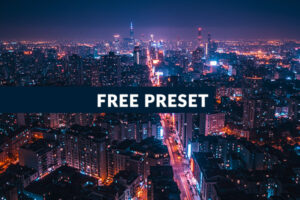
This preset is designed for night street photography, city lights, and low-light portraits. It adds cinematic contrast, controls blues and purples (which often get oversaturated at night), and lifts the shadows without killing the mood.
✅ Free Download:
FUROORE – Nightfall Pro Night Preset
It comes in .XMP and .DNG formats, so you’re covered on both desktop and mobile.
A few years ago, I shot a neon-lit street in Dubai. The colors were insane, but the RAW files looked flat, noisy, and lifeless. I spent hours trying to find a balance that felt dramatic but clean. That edit eventually turned into Nightfall Pro.
Since then, I’ve tweaked it for all kinds of night photos: rooftops, concerts, even foggy alleys. And it just works.
If you’re after a softer, polished vibe, grab the Free Aesthetic Presets Download for a Clean & Stylish Look – perfect for minimalist edits and lifestyle shots.
Try Nightfall Pro. Tweak it. Make it yours. And don’t stress if it doesn’t look perfect right away. Lightroom editing is like cooking, you’ll get better every time you try.
“The camera is an instrument that teaches people how to see without a camera.”
– Dorothea Lange
If this preset helps you out, come back soon, I’ll be dropping more free ones, no strings attached.
Want more editing options? Browse our full Free Lightroom Presets collection to find styles for every mood and photo type.
Related Articles
Your thoughts and questions