Download Free Dreamy Lightroom Preset Soft & Glowing Edit
Michael • June 21, 2025 • 5 min read


Michael • June 21, 2025 • 5 min read

If you’re hunting for a free dreamy preset for Lightroom, you’ve landed in the right place. These magical filters can turn your ordinary photos into ethereal masterpieces without costing you a dime.
Content
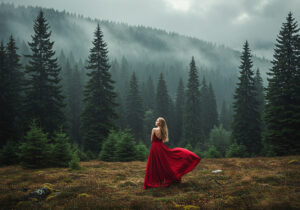
Dreamy presets typically feature soft highlights, muted shadows, creamy whites, and a gentle film-like quality that gives photos an otherworldly, romantic feel.
Dreamy presets have a way of working their charm through some clever adjustments. They typically reduce contrast, gently brighten shadows, and add a hint of film grain. The colors get this lovely pastel treatment, making everything look like it’s enveloped in a soft morning mist.

I found this out for myself during a golden hour shoot a few years ago. My raw images were decent, but after applying a dreamy preset, they turned into something that felt like it belonged in a storybook. The harsh sunset softened into a warm glow, and the model seemed to float in this enchanting light.
Have you ever found yourself spending hours trying to nail that soft, romantic look in your photos? It can be quite a challenge to balance brightness and detail without losing the essence of the mood.
That’s where a preset like this comes in handy. It does the heavy lifting for you, saving you time, keeping your edits consistent, and guiding you toward a style that feels distinctly yours.

| Setting | Typical Adjustment | Effect |
| Highlights | -30 to -50 | Prevents blown-out bright areas |
| Shadows | +20 to +40 | Lifts dark areas for even exposure |
| Whites | +10 to +25 | Creates that creamy, soft look |
| Blacks | +5 to +15 | Reduces harsh contrast |
| Clarity | -10 to -25 | Softens details and textures |
| Vibrance | -5 to -15 | Tones down intense colors |
| Saturation | -5 to -10 | Creates muted, pastel tones |
Installing presets in Lightroom Classic takes just a few clicks.
For Lightroom CC (the cloud version), the process differs slightly.
Once installed, applying presets is simple. Select your photo, click the preset name, and watch the transformation. Don’t expect perfection right away. Most presets work as starting points that need fine-tuning.
No preset works perfectly on every image. Light conditions, skin tones, and subject matter all affect how presets perform.


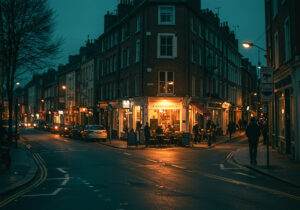
Example image
Grab a free dreamy preset with a gentle glow for family portraits or a soft vibe for landscapes, this style makes your images feel like they belong in a daydream.
✅ Free Download:
It comes in .XMP and .DNG formats, so you’re covered on both desktop and mobile..
Overdoing the dreamy effect ranks as the biggest mistake. When every photo gets the same heavy-handed treatment, your portfolio starts looking like a one-trick pony.
Ignoring skin tones causes problems too. Some free presets make people look sickly or unnatural. Always check how presets affect human subjects before committing to heavy edits.
Using presets on inappropriate photos wastes time. A high-contrast urban street scene probably won’t benefit from a soft romantic preset designed for portraits or landscapes.


Example image
Creating custom presets gives you complete control over your aesthetic. Start with a photo that represents your ideal dreamy look.
Save your adjustments as a new preset once you’re happy with the results. Name it something memorable so you can find it later.
They save time, provide inspiration, and help you understand how professional editors achieve specific looks. The best results come from understanding what each adjustment does and tweaking presets to match your vision.


Example image
Related Articles
Your thoughts and questions