



One-Click Bright Interior Lightroom Presets
$49.90
The Ultimate Interior Presets for Lightroom bundle is expertly crafted for professional interior photographers, interior designers, and home decor bloggers. Whether you’re editing photos for a real estate listing, an Airbnb, or your home decor blog, these presets give you the flexibility to create polished, consistent, high-quality images in just one click.
• 24 One-Click Presets for Every Interior Style
• Optimized for Interior & Home Photography
• Instantly Correct White Balance & Enhance Natural Light
• For Lightroom Desktop & Mobile
• Instant Digital Download

“I use these all the time for my interior design photography. Thy are actually well made and handle mixed lighting really nicely. These presets do the job!” – Renata P., Canada, Interior Designer
Tired of Editing Interior Photos for Hours?
- Correct indoor color casts
- Balance warm and cool light sources
- Enhance whites and neutral tones without blowing them out
- Accentuate natural textures like wood and fabric
- Reveal detail in shadows while maintaining realistic contrast
Best Lightroom Presets for interior design to create professional-grade, magazine-ready edits for interior design, Home and Airbnb listings.
Perfect for Every Interior Professional
- Interior Photographers: Quickly make your photos pop to attract more buyers.
- Interior Designers: Showcase your portfolio with stunning, high-quality images.
- DIY & Home Decor Bloggers: Elevate your blog posts and social media feed.
Every Preset You Need for a Perfect Interior Shot
24 One-Click Professional Presets
Two Versions for Every Look
Get the flexibility you need with both subtle and stronger edits. Choose the style that fits your space and vision, no complicated adjustments required.
- Soft White Glow – Brightens whites, softens light.
- Soft White Glow Plus – Cleaner whites, stronger brightness.
- Neutral Harmony – Balanced tones for natural rooms.
- Neutral Harmony Plus – Richer tones, more color control.
- Golden Hour Room – Warm, cozy afternoon feel.
- Golden Hour Room Plus – Deeper warmth and glow.
- Crisp Modern – Cool tones, clean contrast.
- Crisp Modern Plus – Sharper detail, cooler mood.
- Cool Minimal – Muted tones, relaxed vibe.
- Cool Minimal Plus – Bolder contrast, cooler whites.
- Editorial Luxe – Chic, high-contrast finish.
- Editorial Luxe Plus – Striking, moody, styled look.
- Scandi Bright – Soft light, pale woods.
- Scandi Bright Plus Whiter whites, brighter tones.
- Natural Wood Warmth – Enhances wood and warmth.
- Natural Wood Warmth Plus – Stronger wood tones and glow.
- Bright Boho – Light, colorful, fun.
- Bright Boho Plus – More pop, more brightness.
- Clean White Pop – Real estate–ready clarity.
- Clean White Pop Plus – Crisper whites, cleaner edges.
- Shadow Detail Boost – Lifts dark corners gently.
- Shadow Detail Boost Plus – More recovery, deeper detail.
- Desaturated Calm – Soft, quiet, muted tones.
- Desaturated Calm Plus – Extra low-sat and moody.
One Bundle, Endless Possibilities
» 24 Interior Lightroom Presets
» 15 Clean Edit Presets
» 1x Instruction Guide (PDF)
» File formats: XMP, DNG
* 24 DNG files
Lightroom Interior Presets – Perfect for Any Purpose
Ideal for property listings, Airbnb, design portfolios, or personal projects. Your interiors deserve to look as good in photos as they do in person.
What’s Included
» 24 Interior Lightroom Presets
» 15 Clean Edit Presets
» 1x Instruction Guide (PDF)
» File formats: XMP, DNG
* 24 DNG files
Clean Edit Presets
Use the Clean Edit Presets to make basic adjustments and set the foundation for your image. They also speed-up your workflow and offer you endless style combinations.
Compatible with:
» Adobe® Lightroom® 7.5 or later
» Adobe® Camera Raw 10.5 or later
» Adobe® Lightroom Mobile
Lightroom Interior Presets Example Images


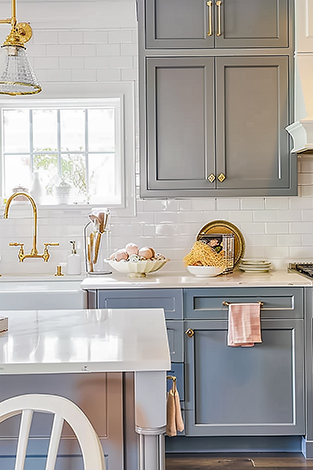


Make your interior photos stand out with clean whites, natural light, and professional results in seconds. Explore even more styles in our Real Estate Presets collection to level up every property shoot.
FAQs
Do you have Tips for the Lightroom Interior Presets?
- Use natural light when you shoot.
- Apply presets before making small tweaks.
- Test both the regular and “+” versions.
- Adjust exposure to match your room brightness.
- Use the White Balance eyedropper for better color.
- Try different presets to see which fits best.
- Save your edited photo in high quality.
- Compare before and after to see the difference.
Do you need more Interior editing Help?
- How to Edit Indoor Photos in Lightroom like a Pro
- Best Lightroom Settings for Interior Photography
- Lightroom Tips for Photographing Small Rooms
Check these out to improve your indoor photos even more.
How to Download the Presets?
As soon as your payment went through, you receive the download link direct by email.
How to Install Presets?
Follow the simple instructions at How to install Lightroom Presets and start using them on your desktop or mobile device.
How to use Lightroom Presets?
Interior Presets for Lightroom with Easy Adjustment
- The Interior Presets for Lightroom have been carefully made by a professional photographer. In short, they are made to look great on many different photos.
- The Presets are very easy to use with the Desktop and Mobile App version of Lightroom. In fact, you can edit amazing photos on your smartphone.
- In the first place, take a photo with your DSLR or mirrorless camera, point & shoot camera, or your smartphone. Second, upload a photo and open it in Lightroom. Third, add the preset to your photo.
- Please keep in mind that preset results can vary with each photo. For example, it can vary depending on the white balance, exposure, tones, and settings of the original photo..
- After applying a preset, you may need to apply some manual adjustments. However, you can move the filter sliders for the desired result.
- A preset may alter the skin tone of a person in your photo. In that case, use the color adjustments within Lightroom till you reach a skin tone that works for you.
- Photos that are overexposed, underexposed, or are of low-quality are not suitable for presets. In that case, you may have limited results.
How to use Clean Edit Presets?
Clean edit presets allow you to set the perfect foundation of your image by adjusting for example white balance, exposure, whites, etc. Each clean edit preset changes only one value, without overwriting other adjustments and values.
Do you have Interior Photography Tips?
Interior Photography Tips for Photographers, Home owners and Enthusiast
Welcome to the world of interior photography, where every room becomes a canvas and every detail tells a story. Whether you’re a seasoned pro or just starting on your photographic journey, these friendly tips will help you capture the magic within the walls of your home.
1. Embrace Natural Light
Lighting is the heartbeat of interior photography. Embrace natural light to create a warm, inviting atmosphere. Position your subjects near windows to harness the soft, diffused glow, and consider shooting during the golden hours for a touch of enchantment.
2. Declutter and Simplify
Before capturing a space, take a moment to declutter and simplify. Tuck away unnecessary items and focus on highlighting the key elements that define the room’s character. A clutter-free space allows your audience to appreciate the beauty of your interiors.
3. Play with Perspective
Experiment with different angles and perspectives to find the most captivating views. Don’t be afraid to get low or shoot from above – changing your vantage point can reveal unique compositions and emphasize the depth and character of a room.
4. Showcase Details
Interior photography is about more than just capturing entire rooms. Zoom in on captivating details – the texture of a rug, the grain of wooden furniture, or the play of light on a decorative element. These close-ups add layers to your visual narrative.
5. Set the Scene
Consider the purpose of the room and set the scene accordingly. Whether it’s a cozy reading nook or a bustling kitchen, add subtle touches that convey the room’s function and personality. A well-styled scene evokes emotions and enhances the overall appeal of your photographs.
6. Experiment with White Balance
Mastering white balance is key to achieving accurate and appealing colors. Play with your camera’s white balance settings or adjust it during post-processing to ensure that the colors in your photos reflect the true essence of the space.
2 Ideal also for Interior Photographers
These interior presets aren’t just for enthusiasts – you can utilize them to showcase properties in their best light. Elevate your listings with professionally enhanced interior photos, making each space more appealing to potential buyers. Discover our advanced Real Estate Presets here.
Remember, interior photography is a delightful journey of discovery. Capture the essence of your home with these tips, and let your creativity shine. Every room has a story to tell – it’s time to share yours through the lens!
“You don’t take a photograph, you make it.” Ansel Adams
How about License/Terms?
You are not allowed to sell or redistribute to another individual and/or party in any way. You can only use these products for your personal or commercial use. This license extends to the single, individual purchaser. This license does not extend to companies or partnerships. All Presets by Furoore are copyright protected.
Due to the downloadable nature of these products, all digital sales are final sales. There are no refunds, returns, or exchanges
5 reviews for One-Click Bright Interior Lightroom Presets
Add a review
You must be logged in to post a review.
• Start getting beautiful Photos in Minutes
Creating pretty photos and looking for the right tone effect can be very tough. For this reason, we at Furoore have spent countless hours for you creating Easy-edit workflow Lightroom presets.
• Quality above Quantity
We respect our customers and try our best to provide extra high-quality presets to simplify the editing. With our presets you achieve unique results in one click. You can easily adjust them to your own style or the look you are going for.
• One Time Lifetime Purchase
You only pay once to use your presets for your photos for as long as you want.
Related products
-33%

Original price was: $149.90.$99.90Current price is: $99.90.
-38%

Original price was: $79.90.$49.90Current price is: $49.90.

Ethan P. –
Easy workflow that makes my listings look polished in minutes. Simple install and quick results.
Jacob F. –
I’ve tried so many free presets and they always blew out my whites or made things too orange. These ones are way more balanced. My project photos look clean and natural. Super happy with the color correction.
Kumar R. –
I share a lot of home inspo shots and I used to fiddle around with sliders for every pic. These presets get me like 90% there with one click. Good value for the money – recommended.
Adrian P. –
This is now my favorite interior editing pack. Very good quality, would buy from here again.
Marcel F. –
This Furoore Interior Presets have helped me present my designs in the best possible light. The presets correct lighting issues and enhance colors, making spaces look more vibrant and inviting. The easy-to-use system allows me to edit photos quickly, saving time without compromising quality. TOP!