Free Aesthetic Presets Download for a Clean & Stylish Look
Michael • June 21, 2025 • 4 min read


Michael • June 21, 2025 • 4 min read

Lightroom aesthetic presets free download, that’s probably what brought you here, right? Whether you’re editing your first batch of photos or you’ve been at it for years, you know how much a good preset can shape your visual style.
These presets are more than just a color filter. They bring mood, identity, and a sense of flow to your feed or portfolio. And yes, you can get them without paying a dime.
Content
Aesthetic presets give your photos a stylish, clean, and visually pleasing look with just one click. You’ll usually see soft tones, muted colors, creamy highlights, and a balance between light and shadow. The style is popular on Instagram, Pinterest, and lifestyle blogs for a reason – it just works.
These presets aren’t tied to one single look. Think warm skin tones, bright whites, subtle shadows, or faded film-inspired colors. Aesthetic doesn’t mean boring or flat. It means intentional and polished.

The best free aesthetic Lightroom presets give your photos a consistent and stylish look with soft tones, warm highlights, and subtle color grading. These are perfect for lifestyle, portrait, and social content. Look for presets with gentle contrast, slightly desaturated greens, and warm midtones.

You’ll want to use aesthetic presets when:
One thing to keep in mind: presets aren’t magic. They need good lighting and decent exposure to really shine. Use the preset as a base, then tweak things like white balance, shadows, or contrast to match your image.
I’ve shot lifestyle content for years – weddings, cafés, beach mornings – and I always come back to the same types of tweaks. I like to slightly lift shadows, lower highlights, and add a touch of warmth to the midtones. Greens? I usually mute them a bit. They tend to pop too much straight out of camera.
If I’m editing for Instagram, I almost always reduce clarity just a bit for a softer vibe.


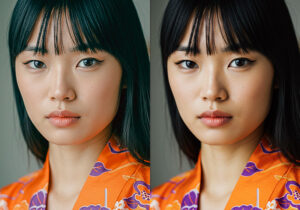
Example image
Grab a free aesthetic preset tailored for portraits, indoor shots, travel and shots with natural light.
✅ Free Download:
It comes in .XMP and .DNG formats, so you’re covered on both desktop and mobile..


Example Image
Want to make your own aesthetic preset from scratch? You don’t need to be a pro. Start with a few small changes that instantly give your photos that clean, soft look.
Here’s a simple setup to try:
That’s all you need for a clean, soft, slightly dreamy look. Once you’re happy with the edit, just click “Create Preset” to save it and reuse it anytime.
It’s a great way to get started with your own style without getting lost in advanced tools.


Example Image
Related Articles
Your thoughts and questions